
This Page contains the following Chapters:
3.5.1 - Activate a SIM card
Primarily our SIM cards are sent out in the pre-activated status "In Testing" and is ready for connection.
If the SIM card is in "Customer Inventory" it must first be verified and then activated to be able to connect to a mobile network:
- Find the relevant SIM card through the search function and mark it.

- Verify that the SIM has the desired Price Plan. SIM cards are listed with a Default Price plan before activation.

- If you wish to change the Price Plan this needs to be done before activate.
While the SIM is marked, press the "Change Price Plan" icon on the SIM grid functions menu.
- Choose the relevant Price Plan and press "Change"
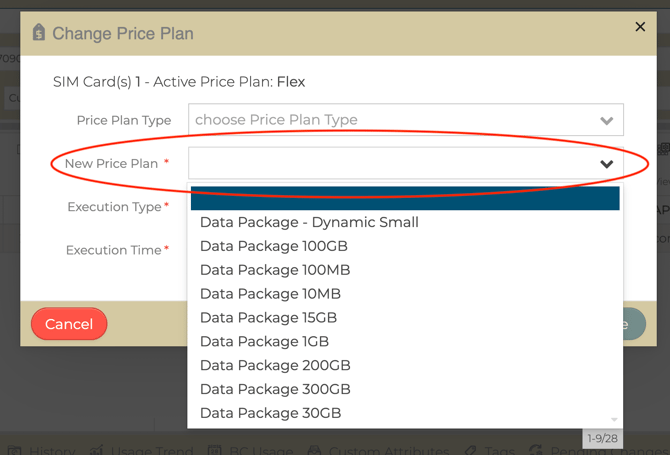
- If you wish to change the Price Plan this needs to be done before activate.
- Verify that the SIM has the desired Roaming Profile. SIM cards are listed with a Default Roaming Profile before activation.
- If you wish to change the default Roaming Profil, press the "Change Roaming Profile" icon in the SIM grid functions menu.

- Select the desired Roaming Profile from the dropdown menu and press "Change"
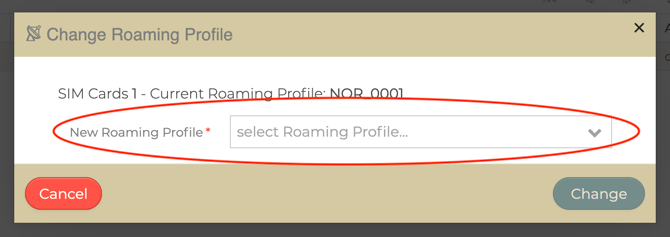
- If you wish to change the default Roaming Profil, press the "Change Roaming Profile" icon in the SIM grid functions menu.
- Activate the SIM card:
- Press the "Change Price Plan" icon

- Choose "Set to Testing (activate) and choose whento activate; either "immediately" or specific date (midnight).
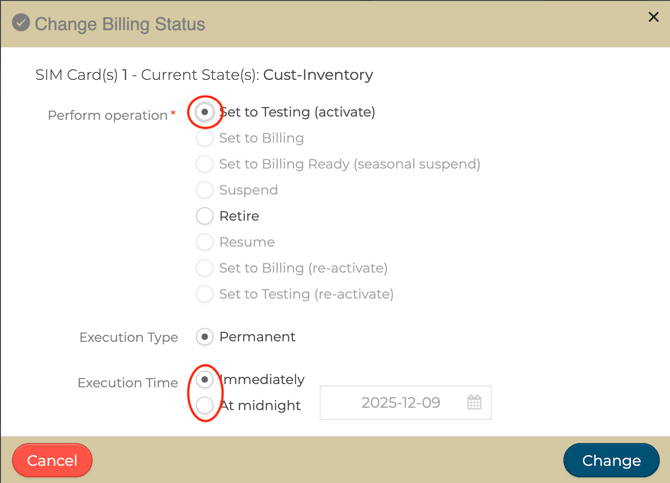
- When chosen, press "Change".
Your SIM card is now activated and ready for Service.
- Press the "Change Price Plan" icon